
Showing posts with label Mandzuik. Show all posts

Kimberly's Power of Photography
A Picture is Worth a Thousand Words

http://www.boredpanda.com/must-see-powerful-photos/
Jojeff's The Power of Photography
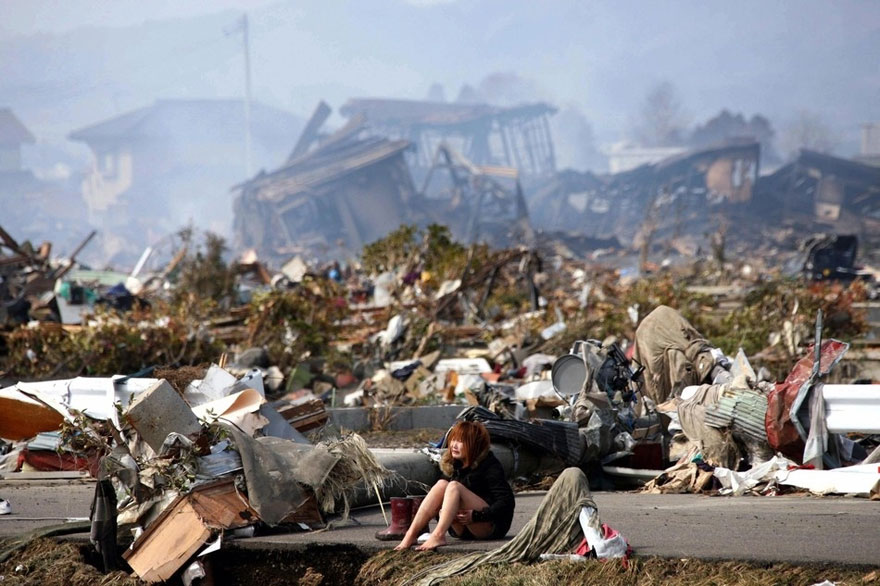


Aaron's Power of Photography Assignment
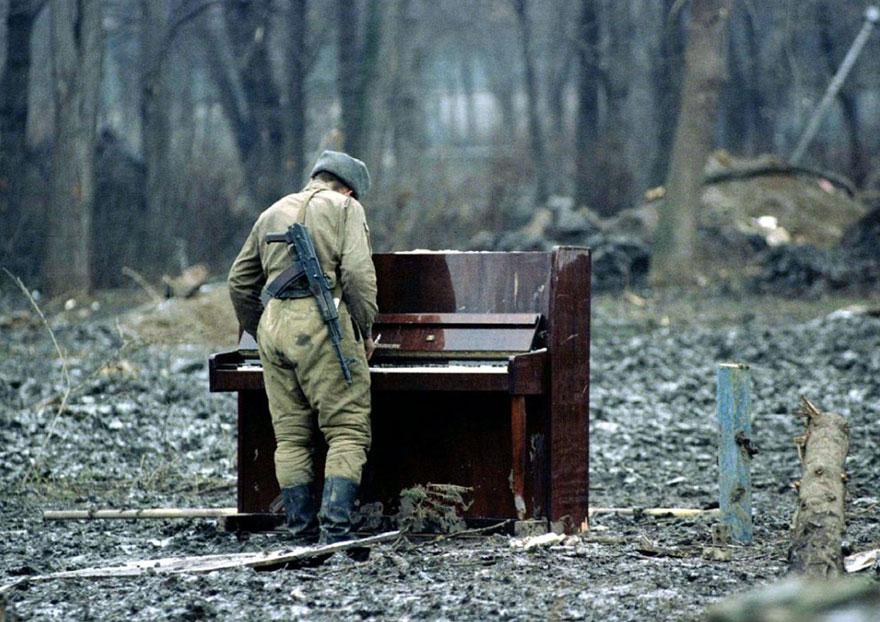
http://static.boredpanda.com/blog/wp-content/uuuploads/powerful-photos/powerful-photos-28.jpg
Pearl's Photomerge Scene Cleaner

Here is my Photomerge Scene Cleaner Assignment
To make this picture, you will need; a model, a camera and a tripod. Be sure to use a tripod to keep your shots as still as possible. As you can see in the picture above, I used Louanne as my model. I took about 6-10 pictures of her doing a cartwheel for me to choose from.
I edited this photo in Adobe Photoshop Elements and used the photomerge scene cleaner mode. I merged a total of 4 pictures altogether, then I changed the lighting and adjusted the brightness. I also added contrast and played with the exposure.
This picture is showing my model, Louanne, doing a cartwheel. Here are some of the photos I used to make this;


Justine's Photomerge Scene Cleaner
Here's my Photomerge Scene Cleaner Assignment:


For this assignment, the equipment that you will need are a camera and a tripod. To create this kind of photo, take 4-6 photos with models and for this one I have Charlene and Heart. Take multiple photos of them doing something, it wouldn't work if the models stays in the same shot, so they have to move.The background has to be the same and the lighting too. After taking photos, you proceed to merging the photos using the app called “Adobe Photoshop”. First off click open and pick the images you want to merge. After this, go “Enhance” and select the “Photomerge Scene Cleaner “. The pictures will load after you have selected them. Now Photomerge Scene Cleaner will have two boxes, the right one is for the one you're merging and the left side the one where your final product is. After merging your photos just click done and save and you're finally finished!
The story behind this picture is nothing fancy, it’s just getting together with someone you’re close with and being happy with each other. I took the pictures near Christmas holiday so I thought a christmas theme one!
Kimberly's Photomerge Scene Cleaner
This is my Photomerge and Scene Cleaner Assignment.

To effortlessly take this type of imagery, you will need three things: a camera, a model or models, and a tripod—because trust me, no matter how hard you try, you can’t persistently stay still. Start off with your models trying different poses and facial expressions. Experiment with your model’s positioning to help convey your story. When taking your pictures, always consider if there had been any background changes in your photos that could impact your end result. Something as simple as a shadow or a slight shift to the left could easily disturb the alignment of your photos—making it more difficult to blend.
To merge your photos, you would use Adobe Photoshop Elements. From the three sections, you would choose “expert,” start off with opening your background picture. Then, click file, place, to insert your next picture. Once your picture is set and aligned, you can erase any unnecessary space. Continue the process until you are happy with your result. With my picture, I actually ended up selecting specific areas by using the lasso and magic wand icons. I wanted to experiment with exposure and brightness levels to create a fading effect.
The story I’m trying to convey is quite heart-rending. The story begins with a couple of best friends; two individuals who brings out each other’s best qualities. No matter the circumstances—you know, you always have someone to catch you when you fall. That person who will climb mountains, just to see you once again. However, when you thought to be at the peak, you were foolishly mistaken. Life is not a movie; you don’t always get happily ever afters. We make mistakes abundantly, such as trusting people too easily. That person who we always thought to be by our side won’t be there forever. There are factors in life that we can’t always control. That person who was once our best friend could instantly become another face in the crowd.
Photos I Used:


Heart's Photomerge Scene Cleaner

In order to make this picture, you will need: a tripod, a camera, and a model. As you can see in the picture above, there is not a single picture where the person is blocking another person's angle/ view. Make sure you spread out the pictures. While taking your shots, keep in mind that moving your tripod will cause all the pictures you are going to take to not align with each other. Another tip is that do not EVER play with the brightness while taking these pictures. The shots will end up not blending with each other. To merge your stuff altogether, you will need to go to Photoshop Elements. Out of the three areas, you need to choose "Expert" then open all your files. After that, click "Enhance" at the very top of the screen. Then, the "Photoshop Elements" button then choose "Scene Cleaner". You can watch the full and detailed video tutorial here.
In this picture, coo- coo Francesca is having too much fun playing on a playground structure in the middle of a winter season. One of the scene in this picture is where Francesca is looking down at herself which looks silly because it REALLY seems like she cloned herself into 6 people and decided that it would be a great idea to go outside on a freezing weather and just have fun with herself and her clones. HAHA
These are the raw photos I used:


Charlene's Photomerge Scene Cleaner

This is my Photomerge Scene Cleaner final copy:
To make this photo you'll need a camera a tripod and some classmates to help convey a story towards the viewer. Without the tripod I don't think anyone could create such a photo. You'll also need to be in a place where the lighting is decent so it doesn't change throughout the photo. Anything could really wreck the whole process of placing these photos in one. You also need more than one photo to merge all together in the end. The right placing of the models is very crucial to making a photo because over lapping can ruin your it.
To make this photo I used Adobe Photoshop, which is really useful when editing photography. My photo turned out not as I really wanted it to be. The lighting and the positioning of the models were a problem I couldn't really fix. It took my a short amount of time to create the photo but sadly was not the best I could do. I took multiple photos and chose the ones that looked the best.
The story of this photo is all about the way you could make someones day better with simple tasks around the school. In this specific photo it shows a class mate leaving their locker after having a long day at school. To make her feel better a letter is placed with the words "Always smile." This may encourage her or make her week better. A simple act can make anyone feel better.
Here are four photos I used to make this photomerge scene cleaner:


Subscribe to:
Posts
(
Atom
)
About

This is the class workspace of Students in the GCT Course at Sargent Park School
Popular Posts
-
Your assignment is to make a 3-4 minute video about this school. What is it? Why is it special? What makes Sargent Park.... Sargent P...
-
 E On this project, I used the "Photomerge Scene Cleaner" tool from Adobe Photoshop Elements 12. This is only possible to do on...
 -
 Here is my photo merge assignment. The equipment required is a tripod and a camera. The tripod is for stability so the camer...
 -
 Here's My Photo Merge Write Up: To make a Photo Merge you have to have at least 5-10 photos in your photo bin. You also hav...
 -
cc photo https://flic.kr/p/cXvUVU by Cog Dog Our first assignment will be learning about cameras. Shots and Angles Assignment 2...
-
 Photomerge Assignment To create this super cool image, a tripod, at least one subject, and of course a camera is nee...
 -
 I took this photo when it was kindness month and I want to show in my assignment how you can make someones day by helping them get ...


Popular Posts
-
Your assignment is to make a 3-4 minute video about this school. What is it? Why is it special? What makes Sargent Park.... Sargent P...
-
E On this project, I used the "Photomerge Scene Cleaner" tool from Adobe Photoshop Elements 12. This is only possible to do on...
-
Here is my photo merge assignment. The equipment required is a tripod and a camera. The tripod is for stability so the camer...
-
Here's My Photo Merge Write Up: To make a Photo Merge you have to have at least 5-10 photos in your photo bin. You also hav...
-
cc photo https://flic.kr/p/cXvUVU by Cog Dog Our first assignment will be learning about cameras. Shots and Angles Assignment 2...
-
Photomerge Assignment To create this super cool image, a tripod, at least one subject, and of course a camera is nee...
-
I took this photo when it was kindness month and I want to show in my assignment how you can make someones day by helping them get ...
Popular Posts
-
Your assignment is to make a 3-4 minute video about this school. What is it? Why is it special? What makes Sargent Park.... Sargent P...
-
E On this project, I used the "Photomerge Scene Cleaner" tool from Adobe Photoshop Elements 12. This is only possible to do on...
-
Here is my photo merge assignment. The equipment required is a tripod and a camera. The tripod is for stability so the camer...
-
Here's My Photo Merge Write Up: To make a Photo Merge you have to have at least 5-10 photos in your photo bin. You also hav...
-
cc photo https://flic.kr/p/cXvUVU by Cog Dog Our first assignment will be learning about cameras. Shots and Angles Assignment 2...
-
Photomerge Assignment To create this super cool image, a tripod, at least one subject, and of course a camera is nee...
-
I took this photo when it was kindness month and I want to show in my assignment how you can make someones day by helping them get ...