
Showing posts with label Kim 9-05. Show all posts
Kim's Panorama Assignment
Jr' High Playground Panorama

For this Panorama, I used the reception effect on Photoshop Elements 12. I like this one the best out of the three because I like how the play structure is there with the snow on the ground and the trees combining with the sky. It looks like its filtered but its not. The sky at the time I took this picture was pretty good and it added contrast to the picture. But what's disappointing is that, only two pictures worked when it was merged and I didn't like how the other Panorama categories merge the pictures. Only the reception effect worked for me.
Pictures I used to create this Panorama :


Dominion/Downing Street Panorama

For this Panorama I used the Spherical effect and It came out well when I filled in the sides it didn't have any imperfections. I just don't like how it looked tilted and the road kind of ruined the picture.
Pictures I used to create this Panorama :


Sargent Park Panorama
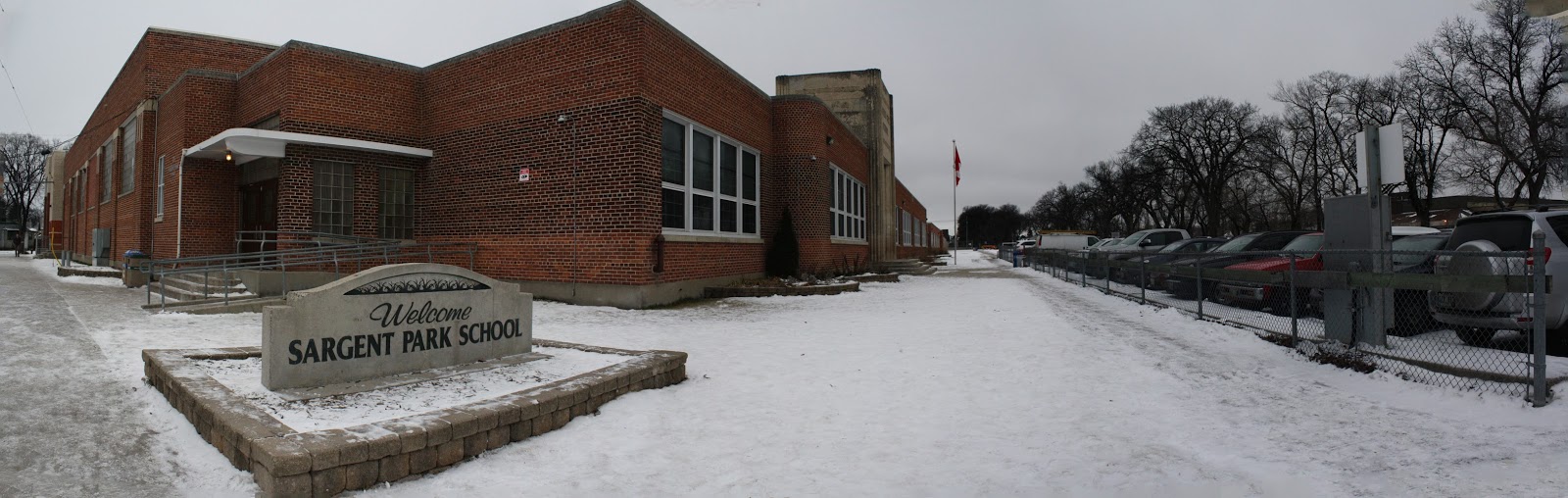
(CYLINDRICAL)

(AUTO)

(SPHERICAL)
For this Panorama, I used three panorama categories. Cylindrical, Auto and Spherical. I don't think it made a lot of difference changing the effect. The only thing I think changed is the direction of the picture as you can see above, the spherical effect look much different than the auto and cylindrical one. The Sargent Park rock and the building look farther even though I cropped it to hide the bad stuff when it was filled in. While the auto effect looks like a normal panorama that you can do with your phone, it's lined up and the cylindrical one I don't really know how to explain it. It looks like it bulged up or it's like a spherical and auto effect combined. By the way I filled in all of it and it looks okay. I just had to crop the last one but just a little bit to remove the imperfections.
Pictures I used to create this Panorama :


Kim's Photo merge Scene Cleaner
E
On this project, I used the "Photomerge Scene Cleaner" tool from Adobe Photoshop Elements 12. This is only possible to do on the Expert part of the Photoshop under the Enhance category for this version.
To make this project possible you will need basic camera equipment's like a tripod and a camera. You will need a tripod because the camera has to stay in one position and if its moved, you won't be able to merge the pictures because the background won't be equal.
As of getting this kind of effect, I took a picture of the background first with no people in it and I go on with taking pictures of my models to act out the positions I wanted them to do in different places but same background so they won't overlap when merged.
On this picture there's only Rein moving towards Henriel because my topic is about making the first move to approach someone to make friends with and this was taken during the kindness month so I tried to come up with an idea about kindness. I took a lot of pictures of different topics but I won't include them here.
I used these pictures to create this project :


I used these pictures to create this project :

( Main Background)


Subscribe to:
Posts
(
Atom
)
About
This is the class workspace of Students in the GCT Course at Sargent Park School
Popular Posts
-
Your assignment is to make a 3-4 minute video about this school. What is it? Why is it special? What makes Sargent Park.... Sargent P...
-
cc photo https://flic.kr/p/cXvUVU by Cog Dog Our first assignment will be learning about cameras. Shots and Angles Assignment 2...
-
 Here's My Photo Merge Write Up: To make a Photo Merge you have to have at least 5-10 photos in your photo bin. You also hav...
 -
 Photomerge Assignment To create this super cool image, a tripod, at least one subject, and of course a camera is nee...
 -
 Here is my photo merge assignment. The equipment required is a tripod and a camera. The tripod is for stability so the camer...
 -
 I took this photo when it was kindness month and I want to show in my assignment how you can make someones day by helping them get ...
 -
My Top 10 Things I'm Going to Miss about Sargent Park
-
 E On this project, I used the "Photomerge Scene Cleaner" tool from Adobe Photoshop Elements 12. This is only possible to do on...


Popular Posts
-
Your assignment is to make a 3-4 minute video about this school. What is it? Why is it special? What makes Sargent Park.... Sargent P...
-
cc photo https://flic.kr/p/cXvUVU by Cog Dog Our first assignment will be learning about cameras. Shots and Angles Assignment 2...
-
Here's My Photo Merge Write Up: To make a Photo Merge you have to have at least 5-10 photos in your photo bin. You also hav...
-
Photomerge Assignment To create this super cool image, a tripod, at least one subject, and of course a camera is nee...
-
Here is my photo merge assignment. The equipment required is a tripod and a camera. The tripod is for stability so the camer...
-
I took this photo when it was kindness month and I want to show in my assignment how you can make someones day by helping them get ...
-
My Top 10 Things I'm Going to Miss about Sargent Park
-
E On this project, I used the "Photomerge Scene Cleaner" tool from Adobe Photoshop Elements 12. This is only possible to do on...
Popular Posts
-
Your assignment is to make a 3-4 minute video about this school. What is it? Why is it special? What makes Sargent Park.... Sargent P...
-
cc photo https://flic.kr/p/cXvUVU by Cog Dog Our first assignment will be learning about cameras. Shots and Angles Assignment 2...
-
Here's My Photo Merge Write Up: To make a Photo Merge you have to have at least 5-10 photos in your photo bin. You also hav...
-
Photomerge Assignment To create this super cool image, a tripod, at least one subject, and of course a camera is nee...
-
Here is my photo merge assignment. The equipment required is a tripod and a camera. The tripod is for stability so the camer...
-
I took this photo when it was kindness month and I want to show in my assignment how you can make someones day by helping them get ...
-
My Top 10 Things I'm Going to Miss about Sargent Park
-
E On this project, I used the "Photomerge Scene Cleaner" tool from Adobe Photoshop Elements 12. This is only possible to do on...