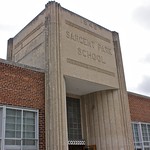
My first Panorama is created using the Auto layout. Compared to the other two it is the most zoomed out, and angled panorama. It is also the Panorama that has more detail, if you take a look at the right side, you can see more of the door compared to the other two. My second Panorama is created using the Reposition layout. Out of the three panoramas, this one if the most filled up and straight one. I also think this one turned out to be the best one because it filled up all the space. The third Panorama is created using the Spherical layout. This one has more curved edges compared to the other two. If you take a close look, the sides of this panorama is a little bit curved back.
This is my photomerge. To make this type of image, you have to use a tripod so there is no movement while you are taking pictures. When t taking pictures for you photomerge, the tripod and camera should not be moving around; it has to stay in one spot. The only thing moving while you are taking a picture is the person in the shot. Your model must be posing in different spots, showcasing something they are doing in the space where you are taking your pictures. While taking your pictures, your model must do different poses in different spots. Make sure they don’t pose in one spot, because that causes the pictures to overlap when you merge them. Once you have all your pictures, you use Photoshop Scene Cleaner to create your photomerge.
My photomerge consists of Sebastian moving from a desk, to the floor, up on the countertop of the canteen, and jumping down to the floor. I took 10 different shots of Sebastian in different places and poses, but I ended up using 7. It doesn’t have much of a storyline, but my idea was to show how he moves around in this space doing different things.